Sailboat Chart Navigation Guide
Sailboat Chart Navigation Guide. Charts are the working reference for sailboat navigation. A navigator uses charts to identify safe water, hazards, depth areas, navigation marks, restricted zones, traffic systems, coastline shape, seabed information and position references. A chart is not a route decoration and it is not a background layer for a vessel icon. It is the control document used to decide whether a course is acceptable before the vessel enters that water. Every course line, waypoint, clearing distance and depth decision depends on what the chart shows and what the navigator understands from it.
A sailboat operating under power or sail has limited stopping ability, limited ability to reverse out of danger, and reduced manoeuvring options in narrow or shallow water. That makes chart use a command function, not an administrative task. The chart must be read before the route is accepted, again before the vessel reaches each critical area, and continuously while the vessel is in water where depth, hazards, traffic or land proximity matter. Electronic navigation has reduced the workload of displaying position, but it has not removed the requirement to inspect chart data. A navigator who follows a plotted line without reading the chart is not navigating.
Chart Use in
Cruising Navigation
The first use of a chart is route control. The route must be checked against land, shoals, drying areas, rocks, wrecks, aquaculture areas, traffic separation schemes, prohibited areas, cable zones, firing ranges, harbour limits and charted obstructions. A safe-looking course line is not valid until the water either side of the line has been checked. The vessel does not travel on a mathematical line; it moves inside a track width affected by steering error, leeway, current, sea state, visibility, traffic avoidance and the navigator’s timing.
The second use of a chart is position control. The navigator compares the vessel’s position with charted land, depth contours, marks, lights, headlands, bearings, radar returns and expected progress. A Global Positioning System (GPS) position displayed on a chart is only one input. The chart provides the surrounding context that allows the navigator to decide whether the displayed position makes sense.
The third use of a chart is decision control. The chart tells the navigator when a decision is required before the vessel runs out of water, room or time. A turn, depth check, speed reduction, traffic assessment or route change must happen before the vessel reaches the danger. The chart helps give that timing. The screen alarm is not the primary control.
Sailboat Chart
Navigation Guide - Paper Charts
Paper charts give a fixed-scale view of the navigation area. They show charted features in a stable layout, without user layers, automatic decluttering or hidden display settings. A paper chart allows the navigator to see the route in relation to coast, depth areas, dangers and alternatives without depending on power, software, satellite reception or screen brightness.
Paper charts remain useful for passage planning because they force the route to be viewed as an area rather than a sequence of waypoints. A course line drawn across a paper chart exposes the water around the route. It also makes it easier to mark danger areas, clearing bearings, tidal gates, depth limits and no-go sectors. When the route crosses a depth contour, passes a headland, enters a marked channel or approaches a restricted area, the navigator can see the decision point before it arrives.
The limitation of paper charts is that they require manual position work. The vessel position must be plotted from latitude and longitude, bearings, radar ranges, dead reckoning or transferred from an electronic system. Course, distance and bearing must be measured. Tidal height and depth calculations must be applied separately. A paper chart also requires correction status control and proper handling in the cockpit or at the chart table.
A paper chart is not automatically safer than an electronic chart. It is safer only when the navigator uses it. A paper chart folded away below deck while the vessel is being steered from a cockpit screen is not a control. A paper chart used for advance planning, route verification and loss-of-electronics backup is a control.
Sailboat Chart
Navigation Guide - Electronic Charts
Electronic Navigation Charts (ENC) reduce plotting workload and provide continuous position display when linked to Global Positioning System equipment. They allow routes, waypoints, alarms, overlays, range rings, bearing lines and vessel data to be presented on one screen. This is useful only when the navigator understands what the display is showing and what it is not showing.
The main operational risk with electronic charts is passive use. The vessel icon can create false confidence because it appears precise. Precision on the screen does not prove chart accuracy, safe depth, correct datum, suitable scale, correct settings or adequate clearance. The navigator must interrogate the display, check the surrounding charted information and confirm that the route remains valid for the vessel’s draft, position and conditions.
Electronic charts also introduce display-management risk. Depth units, safety contour settings, shallow water shading, chart layers, object display, chart datum, route alarms and zoom level can affect what the navigator sees. A chart plotter with the wrong settings can hide information or present water in a way that does not match the vessel’s limitations. Before the route is used, the display settings must match the vessel and the navigation task.
Sailboat Chart
Navigation Guide - Raster Charts
Raster charts are digital reproductions of paper charts. They preserve the paper chart’s appearance, symbols and layout. What is printed on the source chart remains visible on the raster display unless the system itself limits the view through screen size or zoom.
Raster charts are useful where the navigator wants a stable chart presentation. A caution note, rock symbol, depth contour or charted limit remains part of the image. The risk is that zooming into a raster chart only enlarges the original picture. It does not create more survey detail. A raster chart used beyond its compiled scale can look usable while still lacking the detail required for close navigation.
The navigator must treat raster zoom as a viewing function only. When a closer view is required, the correct action is to load the larger-scale chart for the area, not to enlarge the wrong chart.
Sailboat Chart
Navigation Guide - Vector Charts
Vector charts are built from chart objects held in a database. Depth areas, contours, buoys, lights, land, wrecks, restricted areas and other features are displayed as separate electronic objects. The navigator can query objects and adjust display settings, but the chart is dependent on system presentation rules and user configuration.
Vector charts require setup before use. Safety contour, shallow contour, depth units, display category, object layers, alarms and route checking functions must be verified. If the safety contour is set shallower than the vessel requires, the screen may not give a useful visual warning. If chart objects are hidden or simplified, the navigator may not see a hazard, note or restricted area at the time it matters.
Vector charts can change appearance as the zoom level changes. Some information appears at one zoom level and disappears at another. Decluttering can make the screen easier to read, but it can also remove information from view. A clean vector screen is not proof of clear water. It only proves that the selected display mode is showing limited information.
Sailboat Chart Navigation Guide - Chart Scale and
Display Control
Scale remains part of chart use, but it is not the whole subject. A small-scale chart covers a large area with reduced detail. It is used for route overview, offshore planning and context. A large-scale chart covers a smaller area with more detail. It is used where the vessel needs closer control around land, depth limits, hazards, channels and anchorages.
The navigator must know whether the active chart source is suitable for the next decision. Screen zoom does not answer that question. Zoom changes the view. It does not guarantee that the source chart contains enough detail. The chart source, compilation scale or active chart scale must be checked when the vessel approaches water where the available margin is reduced.
A route planned on a small-scale chart must be checked on the larger-scale chart before it is accepted for close navigation. A waypoint that appears clear on an overview chart may lie too close to a shoal, rock, traffic zone or depth contour when inspected at the proper scale. The route is not complete until each critical section has been checked on the chart source that contains the required detail.
Sailboat Chart Navigation Guide - Route Checking
A route check is not complete when waypoints have been entered. Each leg must be inspected from departure to arrival. The navigator checks the line, then checks both sides of the line, then checks the decision points along the leg. The chart must show whether the vessel has enough water, enough lateral clearance and enough time to respond to traffic, tide, visibility, sail handling and steering error.
The route check includes the start and end of every leg. Waypoints placed directly on marks, in traffic lanes, over shallow patches, inside turning basins or close to headlands create avoidable risk. A waypoint is a navigation reference, not a target to hit. The vessel needs room to turn before danger, not at the point of danger.
The route check also includes the off-track area. A sailboat may need to alter course for traffic, wind angle, sail handling, engine failure, visibility, current, sea state or gear problems. If safe water exists only on the exact route line, the route has no margin. The chart tells the navigator where that margin exists and where it ends.
Sailboat Chart Navigation Guide - Hazard Identification
Charts must be read for hazards before the vessel reaches them. Rocks, wrecks, drying banks, overfalls, submarine cables, restricted zones, fish farms, military areas and traffic separation schemes require early identification. A symbol seen late on the screen is not a useful control if the vessel has no time or room to act.
Depth hazards require attention to chart datum, tidal height and vessel draft. The depth printed on the chart is not the water under the keel at the time of passage. A navigator using charted soundings without tidal correction has not completed the depth assessment. Drying heights, shallow contours and isolated soundings need separate attention because they can define the limit of safe water.
Navigation marks must be read with the chart, not treated as stand-alone objects. Buoys can be moved, removed, unlit, damaged or hard to identify. The chart gives their intended meaning and the surrounding danger they mark. The vessel is navigated by the charted system, confirmed by what is seen, not by assuming every visible mark is the expected one.
Using Charts with
Instruments
A chart becomes more useful when it is compared with independent information. Depth sounder trends can confirm whether the vessel is crossing the expected contours. Compass bearings can confirm whether a headland, mark or light lies where the chart indicates. Radar can confirm land shape, range off, headland positions and large targets. Automatic Identification System (AIS) information can be compared with traffic routes and visible vessels.
The sensible navigator does not accept one system because it agrees with itself. A Global Positioning System position on an electronic chart is still one electronic system. The check comes from comparing it with depth, visual bearings, radar ranges, compass course, speed over ground (SOG), course over ground and expected progress. When the information does not agree, the vessel is navigated on the safest assumption until the error is identified.
Global Positioning System signal spoofing occurs when a receiver is fed false position, speed or time data that appears valid. On a chartplotter, this can place the vessel icon in the wrong position while the display continues to look normal, causing the skipper to believe the vessel is clear of danger when it is not. The control is to treat Global Positioning System position as one input only and cross-check it against depth, compass course, radar ranges, visual bearings, Automatic Identification System targets and expected progress. If the plotted position does not match the water depth, land shape, bearings or radar picture, the electronic position must be treated as suspect until confirmed.
Sailboat Chart
Navigation Guide - Chart Use Underway
Underway chart use is continuous. The prudent navigator monitors whether the vessel remains in the planned water, whether the depth matches expectation, whether the next waypoint is still valid, whether traffic requires alteration and whether the available alternatives remain open. A route that was valid at departure can become unsuitable if the vessel is delayed, tide changes, visibility reduces, wind direction shifts or traffic blocks the intended track.
The chart also controls timing. A turn must be prepared before the turning point. A depth check must be made before the shallowest water. A sail-handling decision must be made before manoeuvring room is reduced. An engine-start decision must be made before the vessel is committed to a channel or lee shore. The chart gives the navigator the geometry and timing for those decisions.
Sailboat Chart Navigation Guide - Chart Use Failure
Modes
Chart errors usually come from use, not from the chart alone. The common failures are using the wrong chart, using the wrong scale, trusting zoom, leaving vector layers hidden, setting unsuitable safety contours, placing waypoints without checking surrounding water, ignoring depth datum, and treating the vessel icon as proof of safety.
Another failure is not knowing what chart is active. Some systems change chart source automatically as the vessel moves or as the user zooms. The navigator may think a detailed chart is displayed when the system has shifted to a different source. The active chart, scale and settings must be checked when the navigation risk increases.
A further failure is route transfer without inspection. Routes imported from another device, copied from earlier passages or created automatically by software must be checked leg by leg. A route that fits one vessel, one draft, one tide state or one chart system may not fit another.
Command Standard
for Chart Use
Chart use on a sailboat is a command discipline. The navigator selects the chart source, checks the display, confirms the route, verifies the hazards, monitors the vessel’s position and maintains an alternative. Paper charts and electronic charts are tools. Neither replaces the navigator’s judgement.
Use paper charts for area understanding, route marking, backup and manual position control. Use raster charts with awareness that zoom enlarges the image but does not add detail. Use vector charts with settings checked and object display understood. Use electronic position as a navigation input, not as proof that the vessel is safe.
The operational standard is simple. Read the chart before the vessel enters the water shown on it. Check the route against hazards, depth and available room. Confirm position by more than one method where risk increases. Change to the correct chart source before close navigation begins. Do not allow the screen to make the decision.
Mechanical
and Electrical Repairs Resource
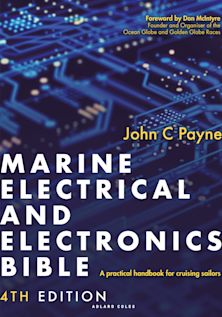
If you are headed somewhere remote consider the need to expand your knowledge base or have an information resource on board. Why not get a copy of my book The Marine and Electrical and Electronics Bible 4th Edition. By and for yachties, with everything from batteries and charging, solar and wind, diesel engines and marine electronics and so much more. Your complete systems guide. 650 pages of practical advice. In Australia and New Zealand order a copy through Boat Books. UK and European boats can buy the UK Edition Here. US and Canadian boats can get the US Edition Order Here. Marine systems are my profession so let me help you. By a liveaboard boat owner for other boat owners.

Sailboat Chart
Navigation Guide – Summary
Charts are the skipper’s primary control reference for route planning, hazard identification, position checking and safe water assessment. Paper charts, raster charts and vector charts each present information differently, and each requires active interpretation rather than passive use. Electronic charts reduce plotting workload, but they do not remove the need to check chart scale, depth information, display settings, route clearance, hazards and position accuracy. Safe sailboat navigation depends on reading the chart before entering the water shown on it, verifying the route against available depth and surrounding dangers, and using independent checks such as bearings, depth trends, radar and observed navigation marks to confirm that the vessel remains in safe water. Sailboat Chart Navigation Guide for all you need to know.